New Patient Instructions
Step 1 — Set up your Patient Portal (MyIO by Valant)
Watch for your invite
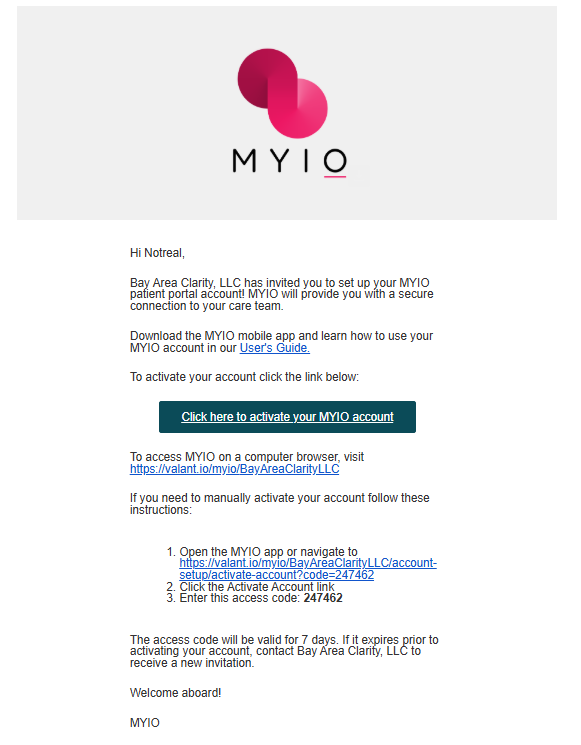
You’ll receive an Invite to MYIO by email or text containing your access code. If you don’t see it, check spam/junk. Access codes expire in 7 days—contact us if yours expires and we’ll send a new one.
Register (web or app)
- Follow the link provided “click here…”
- Follow the prompts
- You will be asked to confirm your child’s date of birth — make sure to enter your child’s birthday, not your own.
On the web:
- Go to bayclarity.com → Patient Portal, or use:
- https://www.valant.io/myio/BayAreaClarityLLC/login
- Click Activate Your Account and enter your access code. (access code is found in the email or text from us)
- You will be asked to confirm your child’s date of birth — make sure to enter your child’s birthday, not your own.
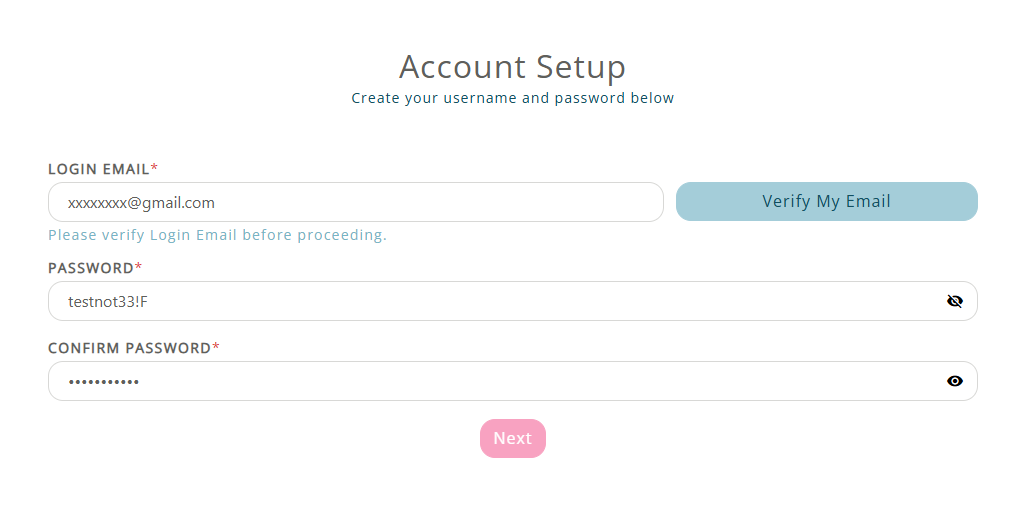
You will then be prompted to provide an email address. MyIO will send a confirmation email containing either a verification link or a second code. Follow the instructions in that email to verify your address before continuing.
On the app (recommended):
- Download MYIO from the App Store or Google Play.
- Open the app, tap Create Account, enter your access code, and confirm your child’s date of birth.
- Enter your email address, then check your email for the verification link or second code and follow the instructions to verify it.

Step 2 — Complete all Required Questionnaires (in the portal)
- Log in via the website portal or the MYIO app.
- Open Forms (or To-Do/Assessments).
- Complete every required questionnaire assigned to you for your child.
- Submit at least 48 hours before your appointment. Incomplete questionnaires can lead to your appointment being rescheduled or canceled.
Step 3 — Complete Practice Forms (sent by email)
Some items (e.g., consent and practice policies) arrive as secure links by email.
- Check the email you provided to the clinic (and spam/junk).
- Open each secure form link, complete all required fields, and submit.
- If a form requests a signature, follow the on-screen steps to e-sign.
- If a link expires or won’t open, call us and we’ll resend it.


Final Step — Schedule Your Initial Appointment
Once onboarding is complete — including all assigned questionnaires submitted and all required forms signed — you may call our office to set your initial appointment.
Appointments cannot be scheduled until your portal access is active and all onboarding items are complete.
Tips & Troubleshooting
- Multiple kids? Each child must have a separate portal account. You will receive a separate access code for each child and must start the setup process from the beginning for each one. This includes entering the unique code, confirming that child’s date of birth, and completing email verification before proceeding to their questionnaires and forms.
- Telehealth users: You can join telehealth from MYIO (web or app) on the day of your visit.
- Best devices: The latest version of Chrome, Safari, Edge, or the MYIO mobile app.
- Name/number changed? Tell us so your invitations and reminders reach you.
Need help?
Bay Area Clarity
Website: bayclarity.com
Phone: 251-999-0102
We’re happy to resend your MYIO invite code or walk you through setup